

Auction categories are defined as structured groupings that organize listings into logical hierarchies, giving buyers a direct path to the items they want. Understanding how auction categories help buyers search is the difference between spending 20 minutes scrolling through irrelevant results and finding the right item in under two minutes. Platforms with optimized product categories see add-to-cart rates increase by 30%. That number reflects a simple truth: organized navigation converts browsers into buyers. Major auction platforms host over 20,000 distinct categories, and buyers who know how to use them gain a measurable edge over those who rely on keyword searches alone.
How do auction categories help buyers search more effectively?
Category-driven search is the fastest way to cut through listing noise. A keyword search for “Rolex” across an entire auction platform returns watches, watch parts, watch boxes, books about watches, and counterfeit accessories. The same search inside the “Wristwatches” leaf category returns only watches, with filters for dial color, case material, movement type, and condition already loaded.

The contrast matters because keyword-only searches mix unrelated categories and drive up bounce rates. Buyers who land on irrelevant results leave. Buyers who land inside the right category stay, filter, and bid.
Humans naturally process information through logical clustering. Structured categories reduce mental fatigue compared to scanning unorganized keyword-heavy results. Less fatigue means faster decisions, and faster decisions mean more confident bids.
Here is what category-driven search does that keyword search cannot:
- Eliminates listings from unrelated product types before you even see them
- Loads filters specific to that product type, such as CFM rating for carburetors or dial color for watches
- Reduces the total number of results to a manageable, relevant set
- Surfaces items that sellers tagged with attributes rather than keywords in their titles
- Lets you sort by ending time, price, or condition within a relevant pool
Pro Tip: Always start your search inside the most specific leaf category available. Broad categories like “Collectibles” give you generic filters. The leaf category “Vintage Postcards” gives you filters for era, region, and condition that simply do not exist one level up.
What are item specifics, and why do they matter for auction filters?
Item specifics are the attribute fields that sellers fill out when listing an item inside a specific category. They are the engine behind precise filtering. When you select the “Carburetors” category, the platform loads filters for CFM rating, brand, finish, and compatibility. None of those filters appear in a general search.
Selecting the leafmost category is the key to activating item specifics filters. This is the single most underused technique among casual buyers. Most buyers search by keyword, get overwhelmed, and give up. Power buyers navigate to the leaf category first, then type their keyword inside that category.
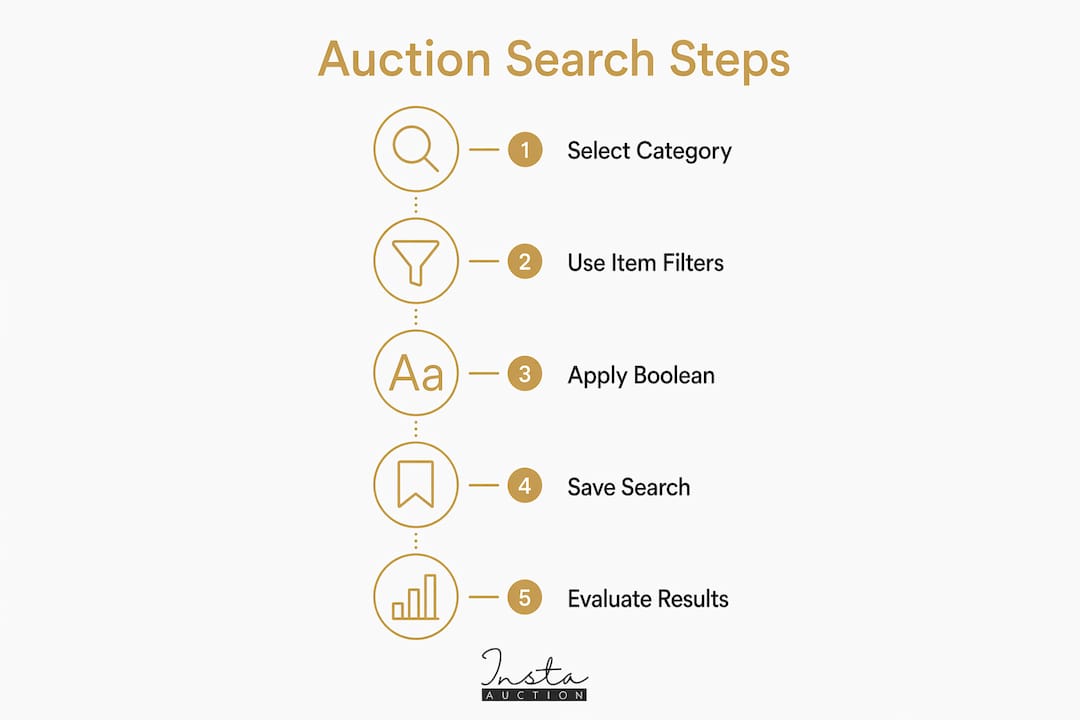
The practical impact is significant. A buyer searching for a vintage Omega Seamaster inside “Wristwatches” can filter by case diameter, movement type, and decade of manufacture. That same search run from the homepage returns thousands of results with no useful filters. The difference is not the keyword. The difference is the category.
Here is what category-specific filters unlock for buyers:
- Dial color for watches (white, black, blue, champagne)
- CFM rating for carburetors (500, 600, 750, 850)
- Grading standard for trading cards (PSA, BGS, SGC)
- Stone type for jewelry (diamond, sapphire, emerald)
- Edition for books and comics (first edition, signed, limited)
Pro Tip: Combine category filters with boolean operators for sharper results. Inside the correct leaf category, use quotes around exact phrases and a minus sign before terms you want to exclude. Searching “Omega Seamaster” -quartz inside “Wristwatches” surfaces only mechanical examples.
Expert auction searchers apply this boolean logic inside correct categories to isolate exact items quickly. It is an advanced technique that takes five minutes to learn and saves hours of scrolling.
How to navigate auction categories effectively
Effective category navigation follows a repeatable process. Buyers who treat it as a system consistently find better items at better prices than those who search randomly.
Identify the correct leaf category before typing anything. Use the platform’s category tree or a category finder tool to locate the most specific subcategory for your item. Searching inside “Jewelry & Watches” is too broad. “Wristwatches” is better. “Wristwatches > Swiss Made > Mechanical” is best.
Use the category tree, not just the search bar. Most platforms display a hierarchical category tree in the sidebar. Clicking through it rather than typing keywords keeps you inside a clean, filtered environment from the start.
Filter by auctions ending soon with few bids. Buyers can increase their chances of winning at lower prices by filtering for auctions ending within one hour that have received few bids. This technique works best inside a specific category because the results stay relevant.
Sort by total cost, not just listed price. Shipping costs vary widely in auction listings. Sorting by price plus shipping inside a category gives you a true cost comparison that a keyword search cannot replicate cleanly.
Watch for category mismatches. Sellers sometimes list items in the wrong category, either by mistake or to reach a broader audience. A vintage camera listed under “Electronics > Cameras” instead of “Film Photography > 35mm Cameras” will miss the filters that serious collectors use. If you cannot find an item in the expected category, try one level up or search by keyword within a broader parent category.
Pro Tip: Save your preferred category path as a bookmark. If you regularly search for pre-loved luxury handbags, bookmark the exact leaf category with your standard filters already applied. You will reach relevant results in one click instead of five.
You can also sharpen your approach by learning to spot undervalued listings within the right category, where misspelled titles and poor photos hide genuine value from less patient buyers.
Keyword-only search vs. category-driven search: what the data shows
The performance gap between keyword-only and category-driven search is not subtle. Marketplaces rely on structured data attached to categories to rank and display relevant items. Keyword-only searches miss many relevant listings because those listings were indexed by attribute, not by title text.
| Factor | Keyword-only search | Category-driven search |
|---|---|---|
| Search relevance | Low to moderate | High |
| Filter availability | Generic or none | Category-specific and precise |
| Mental load | High (large, mixed result sets) | Low (focused, relevant results) |
| Result precision | Broad matches, many irrelevant | Narrow matches, mostly relevant |
| Auction timing filters | Limited | Full access within category |
| Structured data access | Partial | Complete |
Category-driven searches pull from well-structured, indexed data. Keyword searches match title text and miss items where the seller used different wording or relied on item specifics rather than keywords in the title. A seller who lists a watch as “Omega ref. 2913” without writing “Seamaster” in the title will be invisible to keyword searchers but fully visible to buyers filtering inside the correct category by brand and reference number.
The buyer impact is direct. Less scrolling means faster decisions. Faster decisions mean more time to evaluate the items that actually match your criteria. Buyers who use category navigation consistently report higher satisfaction and lower frustration compared to those who rely on keyword searches alone.
Key Takeaways
Auction categories are the single most effective tool buyers have for finding specific items quickly, because they unlock filters and structured data that keyword searches cannot access.
| Point | Details |
|---|---|
| Start at the leaf category | The most specific subcategory activates precise filters unavailable in broader searches. |
| Item specifics unlock precision | Category-specific filters like dial color or CFM rating narrow results to exact matches. |
| Category beats keyword alone | Category-driven navigation reduces irrelevant results and lowers buyer fatigue significantly. |
| Filter for ending-soon auctions | Combining category filters with ending-time sorting surfaces deals with fewer competing bids. |
| Boolean operators sharpen results | Using quotes and minus signs inside the correct category isolates exact items quickly. |
Why I think most buyers are leaving deals on the table
Most buyers I observe treat the search bar as the only tool they need. They type a keyword, scroll through hundreds of mixed results, and either overpay for the first acceptable item they find or give up entirely. Both outcomes are avoidable.
The buyers who consistently win at auction, especially in categories like pre-loved luxury goods and rare collectibles, share one habit. They navigate to the correct leaf category before they type a single character. That one change transforms the search experience completely. The filters that appear are not generic. They are built for that exact type of item.
The subtler point is what categories reveal about seller behavior. A seller who fills out item specifics thoroughly is usually a more serious, knowledgeable seller. Finding their listings through category filters rather than keyword searches means you are already in a higher-quality pool of results. You are not just filtering items. You are filtering sellers.
For high-value auctions, the discipline of category navigation pays off in a way that is hard to overstate. I have seen buyers miss rare finds simply because they searched by keyword and the seller used a reference number instead of a common name in the title. The item was there. The category filter would have found it. The keyword search did not.
If you are serious about auction buying, treat category navigation as a skill, not a shortcut. Practice it on lower-stakes searches until it becomes automatic. By the time you are bidding on something that matters, the process will feel natural and your results will be dramatically better.
— Admin
Insta-auction makes category-driven search work for you
Insta-auction focuses on pre-loved luxury items and collectibles, which means the category structure is built for buyers who know exactly what they want. The platform’s expert appraisers categorize every item with precision, so the filters you rely on actually work.

When you browse luxury goods at Insta-auction, you are not sorting through misclassified listings or fighting through keyword noise. Every item sits in the correct category with complete item specifics, giving you the filter precision that serious buyers need. For buyers ready to put category-driven search into practice, the auction-ready luxury items page shows exactly what well-categorized, expertly appraised listings look like. A portion of every sale also goes to charity, so your winning bid does more than just land you a great find.
FAQ
How do auction categories help buyers find items faster?
Auction categories narrow search results to a relevant pool and unlock category-specific filters that keyword searches cannot access. Buyers reach the right items in fewer steps with significantly less irrelevant noise.
What is a leaf category in an online auction?
A leaf category is the most specific subcategory at the end of a category tree, such as “Wristwatches > Swiss Made > Mechanical.” Selecting the leaf category activates precise item specifics filters that do not appear in broader parent categories.
Can category filters help buyers win auctions at lower prices?
Buyers can filter within a category for auctions ending within one hour that have few bids. This combination surfaces deals with less competition, which directly improves the odds of winning at a lower final price.
Why do keyword searches miss relevant auction listings?
Marketplaces index listings using structured data attached to categories, not just title text. Sellers who rely on item specifics rather than keywords in their titles are invisible to keyword searches but fully visible inside the correct category.
What are item specifics in auction listings?
Item specifics are the attribute fields sellers complete when listing inside a specific category, such as dial color, case material, or grading standard. These fields power the precise filters that make category-driven search far more effective than keyword-only queries.